Best Free AI Music Video Generator: Free Tiers, Limits and Picks

By Nathan Cole
MyClaw Editorial
MyClaw
Run Best-in-Class AI Agents Now
Run OpenClaw or Hermes Agent on managed MyClaw hosting, so your AI agent stays online, updated, and ready for real work.
AI Takeaway
- What is the best free AI music video generator? For turning your own song into a video, Plazmapunk has the clearest free plan, with starter credits, song upload, and no card needed. For custom clips you cut to your track, the MyClaw video generator is a flexible second route.
- Can you make a full music video for free? Usually not a polished one. Most free access is one-time starter or trial credits with a watermark, short clip caps, or personal-use limits, so they work best for a chorus teaser or a style test.
- Which free tools let you upload your own song? Plazmapunk, Freebeat, Neural Frames, Free.ai, and Revid all accept your audio. Clip generators make the visuals, and you add the song in an editor.
- Can free videos be used commercially? Check each license. Plazmapunk's free plan is personal use only and Freebeat's free credits are for non-commercial use, while paid plans add commercial rights.
- How does MyClaw fit into a music video workflow? The MyClaw video generator creates short MiniMax H3 clips from text prompts, which you then arrange and cut to your song in any video editor.
Three Kinds of Free AI Music Video Generator
"Music to video" tools work in three different ways.
- Song-to-video generators. Upload a track, describe a style, and the tool plans scenes and times them to the music. This is the fastest route to a finished video.
- Audio-reactive visualizers. The visuals pulse, morph, or flicker with the audio. Great for producers, Spotify Canvas loops, and instrumental tracks.
- AI clip generators. You prompt short clips, such as the MyClaw video generator, and edit them to the song yourself. More work, but more control over every shot.
If you still need the track itself, this Suno v6 review covers making the song first.
Free AI Music Video Generators Compared
Free allowances below come from each vendor's pricing, FAQ, or terms pages, read in November 2026.
| Tool | Type | Free access | Free output limits | Your own audio | Free-tier use |
|---|---|---|---|---|---|
| Plazmapunk | Song-to-video | 200 one-time starter credits, no card | 4:3 only, small watermark | Yes | Personal use only |
| MyClaw video generator | AI clip generator (MiniMax H3) | Usage per plans on the page | Short clips; set ratio and resolution | Not listed; add the song in an editor | Check plan terms |
| Freebeat | Song-to-video | Starter credits, no recurring refill | Up to 30 seconds per video, may carry a watermark | Yes | Non-commercial |
| Neural Frames | Song-to-video and frame-by-frame animation | One-time trial credits (about 20 seconds of frame-by-frame video) | Trial-sized | Yes | You own your videos; commercial use confirmed on paid plans |
| Free.ai | Looped music video | Daily tokens, more with a free account | Full song up to 10 minutes, one clip repeated (per vendor) | Yes, up to 50 MB | Commercial use OK (per vendor) |
| Revid | Song-to-video | Free signup credits, no card | Trial-sized; regular creation uses paid credits | Yes | Check plan terms |
For a closer look at a video model that several of these tools offer, see this Seedance 2.5 overview.
1. Plazmapunk

Plazmapunk is the most straightforward free option for turning a song into stylized visuals. Its free plan includes 200 starter credits with no card, custom music upload, and 4:3 video generation. Standard generation costs about one to two credits per second, according to its FAQ, so the free credits cover a first short video.
The catches are clear: free videos carry a small watermark, stay in 4:3, and are for personal use only. Paid plans start at €9.99 a month and add all aspect ratios, Full HD upscaling, no watermark, and a commercial license.
Best for: testing a visual style on your song before paying. Strong visual direction helps, and this guide on how to create a music album cover can help you settle on colors and mood first.
2. MyClaw Video Generator
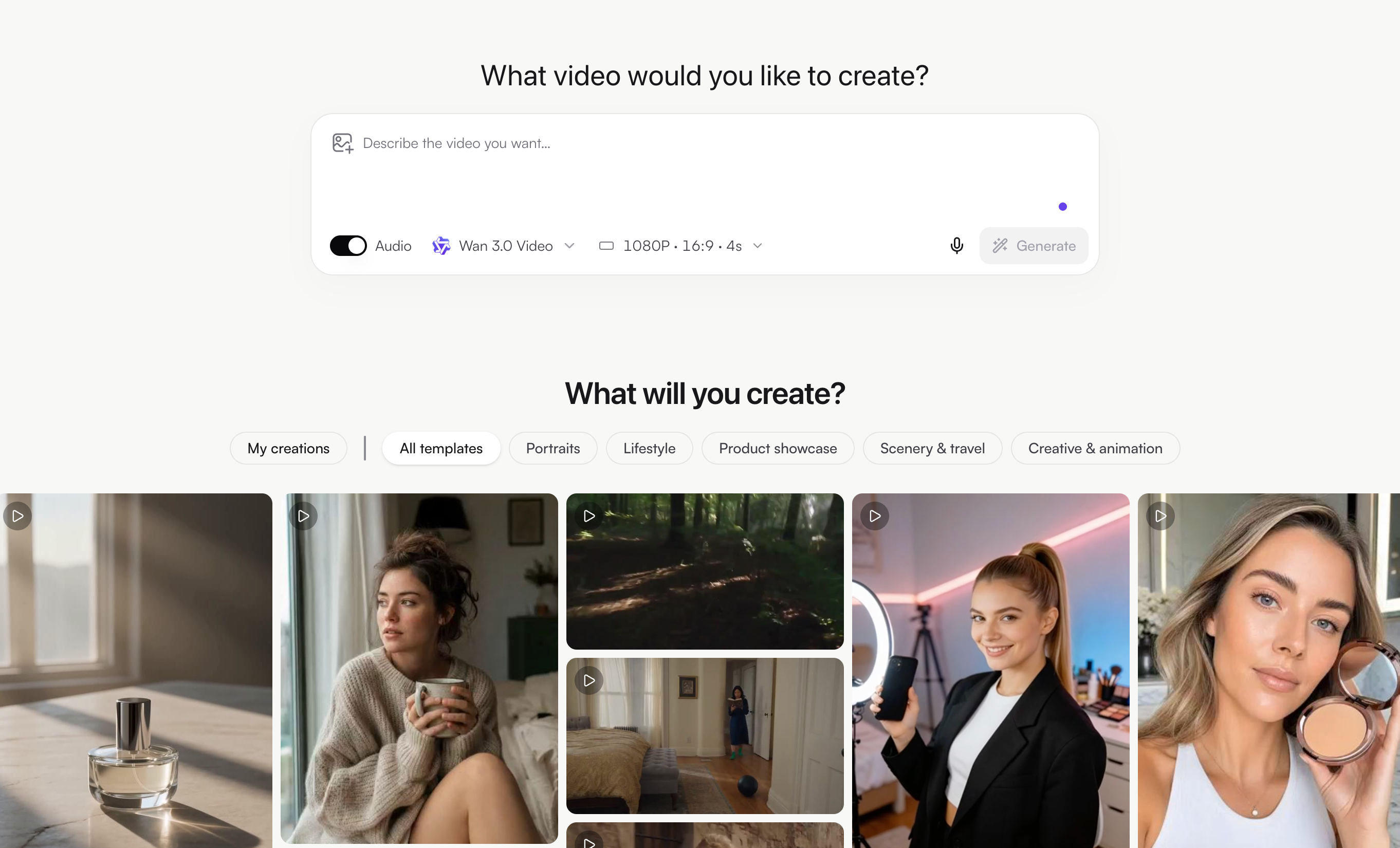
The MyClaw video generator takes a different route. Instead of reading your song, it creates short AI video clips from text prompts, and you build the music video from those clips. MyClaw offers it in the browser, and you can choose MiniMax H3 as the model, then pick the aspect ratio and resolution options shown for it.
This suits musicians who want specific shots rather than an automatic edit:
- A cinematic hero shot for the chorus
- Short looping b-roll for the verses
- Mood scenes that match key lyrics
- A vertical teaser for Shorts, Reels, or TikTok
Workflow:
- Split your song into sections: intro, verse, chorus, bridge.
- Write one prompt per section, repeating the same character, palette, and camera style.
- Generate a few clips per section and keep the best.
- Arrange the clips in your video editor, cut on the beat, and add your song and lyrics.
Example prompts:
- "Slow dolly shot of [singer description] on a rooftop at dusk, neon city lights, teal and magenta, cinematic"
- "Close-up of rain on a car window at night, soft bokeh, moody blue tones, gentle camera drift"
- "Crowd of silhouettes dancing under strobe lights, wide shot, high energy, purple haze"
Song upload and beat sync are not listed for this tool, so plan to do the timing in your editor. Usage allowances are shown on the page. For more on the model, see this guide to MiniMax H3 free online.
Best for: custom, consistent shots you control and edit to your track.
3. Freebeat

Freebeat is built around music-first generation. Upload a song, and it plans scenes automatically. New accounts get starter credits for non-commercial use, though Freebeat's own pages list different amounts, so check the number on your account. Free videos are capped at 30 seconds and may carry a small watermark. Paid plans raise videos to up to 5 minutes and remove the watermark.
Best for: a free 30-second chorus video for personal sharing.
4. Neural Frames
Neural Frames offers scene-based Autopilot videos and a frame-by-frame editor where motion can follow your song. Its help center lists BPM-synced oscillators, plus stem-based audioreactivity (kick, snare, bass, vocals) on Neural Knight and higher plans. The free trial credits equal about a couple of Autopilot storyboards or about 20 seconds of frame-by-frame video.
Neural Frames says created videos belong to you, and its pricing page confirms commercial use on paid plans, from $26 a month billed yearly. It also offers a free MP3-to-MP4 converter for simple audio visual posts.
Best for: testing a style, then building beat-driven visuals on a paid plan.
5. Free.ai Music Video
Free.ai takes a simple approach. According to its music video page, you upload a song up to 50 MB, describe one scene, and get an MP4 that runs the full length of the track, up to 10 minutes, with one generated clip repeated to fill it. The same page says output has no watermark, commercial use is OK, and daily tokens are available without an account, with more on a free account.
Best for: a full-length lyric-free backdrop or a quick YouTube upload.
6. Revid

Revid's music video generator accepts an MP3, WAV, or Suno link, lets you choose beat or lyric timing, and can add lyric captions and singer lip sync. New accounts get free credits to try it without a card; regular creation uses the monthly credits on paid plans, which start at $39 a month.
Best for: trying beat-synced or lyric-synced scenes on one short section.
Make a Music Video From Short AI Clips
Whichever clip tool you use, the same editing habits help:
- Start with the chorus. It is the part people share, so make it first.
- Keep clips short. Five to ten seconds per shot keeps pace with most songs.
- Cut on the beat. Place cuts on downbeats or snare hits in your editor.
- Repeat visual anchors. The same character, color, or location ties scenes together.
- Add lyrics last. Captions are easier to time once the edit is locked.
For more on how MiniMax H3 handles motion and prompts, see this MiniMax H3 AI review.
How to Get More From Free Credits
- Test one section. Spend free credits on 15 to 30 seconds of the chorus, not the whole song.
- Lock a style early. Changing styles mid-project wastes credits.
- Check the license before posting. A personal-use video should not go on a monetized channel.
- Own your audio. Every tool here makes you responsible for the rights to the song you upload.
- Compare models. Some tools let you choose the video model, and this Kling 4.0 review explains one popular option.
Conclusion
The best free AI music video generator depends on how much of the work you want the tool to do. Plazmapunk, Freebeat, Neural Frames, Free.ai, and Revid let you start from your own song, each with its own free limits. The MyClaw video generator suits creators who want custom clips and are happy to edit them to the track. Start with a short section, check the license, and upgrade only when a tool proves it fits your sound.
Skip the Setup, Run Best-in-Class AI Agents Now
Launch a managed OpenClaw or Hermes Agent workspace in minutes, with always-on hosting, updates, and support handled by MyClaw.