Claude Opus 5.5 vs GPT-6 Astra: Price, Benchmarks & Best Fit

By Emma Reed
MyClaw Editorial
Compare in MyClaw
Compare Claude Opus 5.5 and GPT-6 Astra on your own work
Run the same hard job in both models to compare quality, recovery, speed, and cost before choosing a stack. Neither is an automatic default.
AI Takeaway
- Which should you choose? Start with Opus 5.5 when lower API rates and strong coding or knowledge-work results matter. Test Astra when its end-to-end reasoning or computer-use fit could improve a difficult job.
- Which costs less? Standard API rates are $4/$20 per million input/output tokens for Opus 5.5 and $10/$50 for Astra. Cache, effort, retries, and tool charges change the final bill.
- Who leads the benchmarks? The published tables show strengths in different areas, but they are not a fully matched test. Treat them as signals, then compare both on your task.
- Can you use either in an OpenClaw agent? Check the model IDs exposed by your provider first; availability and billing depend on the route you use.
Claude Opus 5.5 vs GPT-6 Astra at a Glance
| Detail | Claude Opus 5.5 | GPT-6 Astra |
|---|---|---|
| Standard API input | $4 per 1M tokens | $10 per 1M tokens |
| Standard API output | $20 per 1M tokens | $50 per 1M tokens |
| Context / max output | 1M / 128K tokens | 1.05M / 128K tokens |
| Vendor-stated focus | Long-running coding and knowledge work | Complex reasoning, coding, computer use, research, and documents |
On standard rates, Astra costs 2.5 times as much per input and output token. These are API rates, not Claude or ChatGPT subscription prices; app plans have their own access rules and usage limits. Price is a useful starting point, not a verdict: if a model finishes in fewer calls or needs less repair, its cost per accepted task can be lower than the rate card suggests.
The published specifications are close on context and maximum output. A large context window helps with long files and histories, but does not guarantee that a model will use every detail correctly. For Astra's rates, limits, and current access notes, see this GPT-6 Astra review.
Where the Published Benchmarks Point
Anthropic's comparison table gives Opus 5.5 higher scores on two coding evaluations, while Astra leads on the science row below. These are useful clues, but not a fully controlled head-to-head. The figures come from vendor-published evaluations. Anthropic says its Opus 5.5 results generally use adaptive thinking at max effort; for Terminal-Bench, it reports Opus at xhigh and Astra at high, using OpenAI's published Astra result. The table also includes evaluations run by different organizations.
| Evaluation | Opus 5.5 | GPT-6 Astra |
|---|---|---|
| Terminal-Bench 4.0 | 66.4% (xhigh) | 57.9% (high) |
| FrontierCode v1.1 (Main) | 54.4% | 53.3% |
| Terminal-Bench Science 0.1 | 58.7% | 64.6% |
Use the table to decide what to test, not to declare a universal winner. A score alone cannot predict which model will do better in your repository, browser, or workflow.
For another example of why benchmark provenance matters, compare the different signals discussed in this GPT-6 Astra and Claude Fable 5.1 comparison.
Coding and Long-Running Agent Tasks
Anthropic describes Opus 5.5 as suited to long-running agentic coding and knowledge work. OpenAI positions Astra for difficult end-to-end jobs, including coding and computer use. Treat those descriptions as hypotheses for your workload, then measure pass rate, tool calls, retries, and repair.
For a practical comparison, give both models the same issue and repository snapshot. Score whether the change passes the same tests, follows the requested constraints, and can be reviewed without substantial repair. Record tool calls and retries as well as the final result. A model that writes more code is not necessarily the one that closes the task.
Computer Use, Research, and Knowledge Work
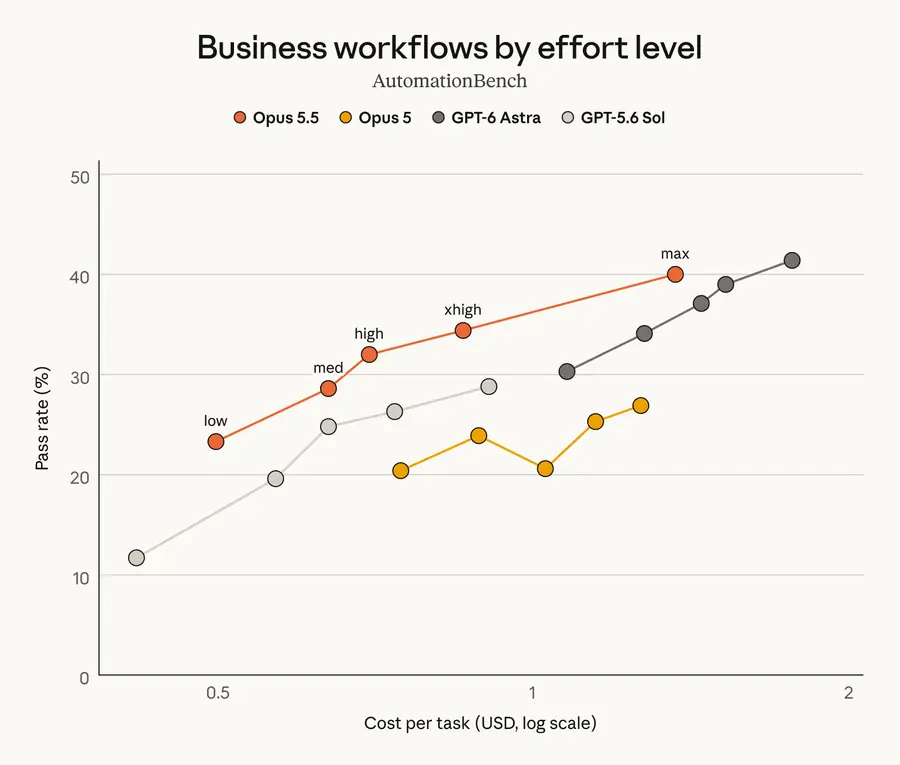
Astra's positioning includes computer use, research, and document creation; Anthropic highlights computer use and knowledge work for Opus 5.5 too. Published results are not enough to predict performance inside your specific apps. Test the actions that matter: whether the agent reaches the right screen, records accurate information, cites the source you asked for, and recovers safely from a failed step.
For browser or desktop work, define the allowed actions in advance and check every change before treating a run as successful. For research, spot-check claims and citations. For office work, judge the delivered file, not just the explanation around it.
Compare API Prices and Cost per Finished Task
The standard input and output rates are listed above. Both models also have separate prices for cached prompts, so actual charges depend on the input/output mix and how much of a repeated prompt is cached. Tool-use fees may apply depending on the provider and workflow. Check the current rate cards before setting a production budget.
A useful comparison is:
Cost per accepted task = (first-attempt model and tool charges + incremental retry charges + the dollar value of review and repair time) ÷ accepted tasks
Use the same hourly value for review and repair time on both sides. Run several representative tasks rather than relying on one lucky completion. Keep the inputs, tools, permissions, and definition of “done” as similar as possible. Effort controls are vendor-specific, so record the setting used instead of assuming identically named levels require the same compute.
If the agent will run continuously, include its hosting cost as a separate line from model usage. MyClaw's pricing page lists managed hosting plans; check the provider's model charges separately.
Which Model Should You Choose?
Start with Opus 5.5 if it already meets your quality bar and you want lower standard token rates for coding or knowledge-work tasks. It is also a sensible first test when long-running agent work is your main use case.
Test GPT-6 Astra if your workload needs its difficult end-to-end reasoning or computer-use capabilities, and a higher token rate is justified by a better completion rate. Its published benchmark profile is not a reason to move every task automatically.
Keep your current model when it reliably finishes the work, or when one of these model IDs is not available through your provider. To decide which model is best for an OpenClaw workflow more broadly, see this guide to choosing a model for OpenClaw.
Use one representative task to begin: give both models the same input and instructions, expose the same tools and permissions, and apply the same pass/fail rubric. Then compare accepted output, retries, elapsed time, review effort, and total cost. If Astra costs more but materially increases successful completions, it may be the better choice for that task. If Opus 5.5 clears the same bar at lower cost, there is little reason to pay the higher rate.
Run a Matched Agent Trial With MyClaw
A managed, always-on OpenClaw runtime can keep an agent available for recurring work without tying the run to a laptop session. It does not make the model choice for you: confirm which IDs your provider and workspace expose, and account for hosting and model usage separately. MyClaw's model catalog is the place to check its current published model list.
- Choose one recurring job. Pick a task with a clear pass/fail rule, such as fixing a test failure or preparing a sourced report.
- Check access and run a fair comparison. Confirm both IDs are callable, then use the same inputs, tools, permissions, and comparable effort settings.
- Keep the model that finishes reliably. Compare accepted work, retries, review time, and model charges across several runs.
Choose by the Job, Then Verify the Cost
Opus 5.5 has the lower standard token rates and strong vendor-reported coding results; Astra has a different capability profile for demanding end-to-end and computer-use work. Neither price nor benchmark score alone settles the choice. Verify access, run the same real task in both, and promote the model that improves completed work enough to justify its cost.
Compare in MyClaw
Compare Claude Opus 5.5 and GPT-6 Astra on your own work
Run the same hard job in both models to compare quality, recovery, speed, and cost before choosing a stack. Neither is an automatic default.