Nano Banana 2.1 Review: Pricing, Upgrades, and Limits

By Alex Morgan
MyClaw Editorial
Nano Banana 2.1
Try Nano Banana 2.1
Start a chat with Nano Banana 2.1 and test it on a brief you already need.
Chat with Nano Banana 2.1AI Takeaway
- What is Nano Banana 2.1? Google's image-generation and editing model, released October 6, 2026, with API ID
gemini-nano-banana-2.1. - What improves? Google reports stronger visual design, more consistent subjects, and better editing. Small text and precise reference matching still need review.
- What does it cost? Standard API image output costs $0.0336 at 1K, $0.0504 at 2K, and about $0.113 at 4K, before other request charges.
- Should you switch? It is worth testing for recurring graphics and reference-based edits. Compare usable results and total costs with your existing model.
What Is Nano Banana 2.1?
Nano Banana 2.1 is Google's update to Nano Banana 2, also known as Gemini 3.1 Flash Image. Built on Gemini 3.6 Flash, it generates and edits images at 1K, 2K, or 4K. Nano Banana Pro refers to the separate Gemini 3 Pro Image model.
Google AI Studio and the Gemini API provide access to 2.1. Use the API for programmatic generation or an app for individual creative tasks. Check the model name and available controls before paying for access.
When choosing an AI image generator, consider reference uploads and revision controls alongside model quality. This review assesses Google's documentation and published evaluations; it is not an independent hands-on benchmark.
Nano Banana 2.1 Review: Image Quality and Editing
Text, layouts, and visual design
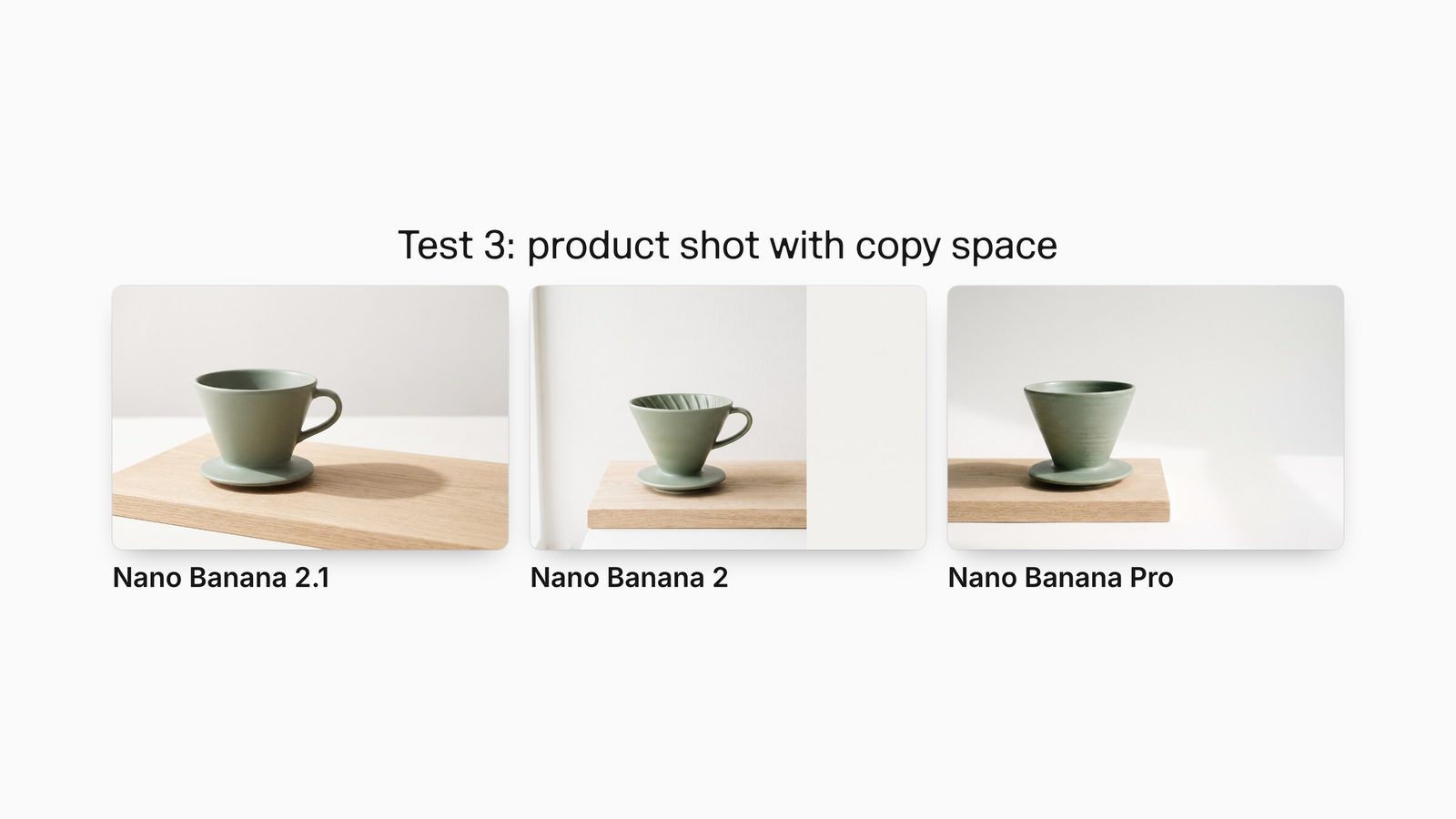
Google reports better text rendering and layouts. Its overall text-to-image preference evaluation gives 2.1 with thinking an Elo score of 1050 ± 14, versus 990 ± 7 for Nano Banana 2 with thinking and 935 ± 8 for Pro. These relative preference scores support a trial; they are not percentages of quality improvement.
For party invitation designs, give the model the exact event name, date, and location. Separate that copy from instructions about color and style. This makes errors easier to spot than a prompt that asks for “a beautiful invitation” and leaves the wording open.
Better typography still needs proofreading. Google's model card acknowledges problems with small text and longer passages. Inspect the exported image at its intended display size; a clean thumbnail can conceal a wrong letter or unreadable detail.
Reference consistency and targeted edits
The API supports up to 14 reference images, with documented consistency capabilities for up to four characters and ten objects. That makes campaign variations and multi-subject compositions useful test cases.
For a LinkedIn headshot, compare facial features with the original before judging lighting or background. For products, check the silhouette, label, and proportions across versions.
The model card still lists imperfect character consistency, incomplete instruction following in masked edits, and occasional persistence of the original pose. Describe what must stay fixed as explicitly as what should change.

Panoramic images and thinking controls
The API documentation describes fixes for tiling artifacts in panoramic outputs at 2K and 4K, including extreme shapes such as 8:1. Thinking settings are minimal, medium (the default), and high.
For banners or virtual background concepts, review the edges as carefully as the center. Look for repeated objects, awkward joins, and details that become distracting after cropping. A wide canvas also needs a deliberate focal point; extra width alone does not create a usable composition.
Start with medium thinking and compare high on difficult compositions. Check whether the extra reasoning improves usable results enough to justify the time and cost. Verify factual labels and left/right placement separately.
Nano Banana 2.1 Pricing: Image Cost vs. Your Full Bill
Standard and Batch prices by resolution
Google's published API image-output prices, checked October 8, 2026, are in USD:
| Resolution | Nano Banana 2.1 Standard | Nano Banana 2.1 Batch | Nano Banana 2 Standard |
|---|---|---|---|
| 1K | $0.0336 | $0.0168 | $0.067 |
| 2K | $0.0504 | $0.0252 | $0.101 |
| 4K | About $0.113 | $0.0567 | $0.151 |
The “half-price” description fits 1K and 2K approximately. At 4K, the reduction is about 25%. Google's token calculation is 3,780 × $30 per million, or $0.1134 before rounding.
Batch processes requests asynchronously with a target turnaround of 24 hours. It suits work that can wait, such as preparing a set of campaign variations. Standard is the practical starting point when you need to inspect a result before requesting the next edit.
Inputs, thinking, and retries change the total
Standard input is $1.50 per million tokens, up from $0.50 on Nano Banana 2. Text/thinking output is $7.50 per million tokens, up from $3. Reference-heavy editing or extensive thinking can therefore offset some image-output savings. Chargeable search grounding adds another cost.
For budgeting, count generations rather than final files. Suppose you need 100 approved 2K images and average two generations per accepted image. Image output alone would cost 200 × $0.0504 = $10.08, before the other charges. This is an illustration, not a measured success rate.
For a useful comparison, divide total generation spending by the number of images you accept. Keep review time alongside that figure: a cheaper image that takes several revisions may be a worse purchase.
The model has no Google API free tier. App trials and subscriptions have separate terms: MyClaw AI Chat plans, for example, provide image-generation allowances rather than Google's per-image billing. Check the available models and usage limits when comparing access options.
Nano Banana 2.1 vs. Nano Banana 2: Should You Upgrade?
For frequent 1K or 2K generation, lower output prices make 2.1 an appealing upgrade candidate. For 4K work or long editing sessions, compare the full bill more carefully. Better consistency may matter more than the headline discount.
Run the same three briefs through your existing model and 2.1:
- A text-led layout: require exact spelling, readable small copy, and clear hierarchy.
- A reference-based edit: preserve identity or product details while changing the scene.
- A wide composition: check the full frame and the crop you will actually publish.
Use identical references and output sizes. Compare correction rounds, accepted images, and total spending.
Keep your existing model for tasks it still handles better. Higher aggregate scores do not settle every style preference or demanding typography task.
For API users, Google's October 6 release notes mark gemini-3.1-flash-image deprecated, without announcing a shutdown date. Plan migration and verify your integration's model ID rather than assuming the upgrade happens automatically.
Build a Repeatable Image Workflow with MyClaw
A recurring campaign needs a consistent brief as much as a capable model. Use MyClaw's image workspace to prepare and refine assets with its available models. Nano Banana 2.1 availability on MyClaw was not verified for this review; check the selector if that version is essential.
- Start with a usable brief. Specify the asset, audience, exact visible copy, composition, and reference material. For a campaign image, identify what must remain unchanged, such as the product shape or wording. Keep creative preferences separate from these requirements.
- Choose an available model and refine one variable. Generate a first version, then request a specific revision: simplify the background, move the headline, or change the crop. Focused instructions make it easier to see whether an edit solved the problem.
- Review the result and preserve the brief. Check spelling, subject fidelity, and the final display size. Save the approved requirements and reference choices so the next asset starts from a clear brief rather than a vague request to reproduce the style.
If preparing those briefs becomes recurring work, managed OpenClaw hosting provides a private, always-on agent for research and preparation. This is a separate MyClaw product from AI Chat; image-provider connections require their own configuration and support checks.
Verdict: Judge the Cost of an Approved Image
Move one repeatable workload to Nano Banana 2.1 first. Set a budget and define what counts as publishable before generating. Expand when the gains in quality or correction time justify the total cost. That gives you a concrete reason to adopt the model beyond its launch claims.
Put Nano Banana 2.1 to work on a real image
Start a chat with Nano Banana 2.1 and test it on a brief you already need.
Chat with Nano Banana 2.1