Sora Alternatives: Where to Make AI Videos Now (Free and Paid)

By Emma Reed
MyClaw Editorial
MyClaw
Run Best-in-Class AI Agents Now
Run OpenClaw or Hermes Agent on managed MyClaw hosting, so your AI agent stays online, updated, and ready for real work.
AI Takeaway
- Is Sora still available? No. OpenAI discontinued the Sora web and app experiences on April 26, 2026, and the Sora API on September 24, 2026. Its help center says former users can still export content they created.
- What is the best Sora alternative? It depends on the job. The MyClaw video generator suits quick prompt-to-clip work, Google Flow offers Veo 3.1 Lite on daily credits, Runway is a full creative suite, Kling is a popular standalone app, and Wan 2.2 runs on your own GPU.
- Are there free Sora alternatives? Yes, with different kinds of "free." Google Flow gives 50 credits a day, Runway gives 125 one-time credits with a watermark, Kling may grant credits to free accounts during promotions, and Wan 2.2 is open source but needs capable hardware.
- Can you reuse your Sora prompts? Yes. Most prompts carry over, but you may need to shorten scenes to fit each tool's clip lengths and pick the aspect ratio again.
- How does MyClaw fit as a Sora AI alternative? The MyClaw video generator creates short clips from text prompts with MiniMax H3, right in the browser.
What Changed With Sora
OpenAI's help center lists two dates. The Sora web and app experiences closed on April 26, 2026, and the Sora API, including the sora-2 and sora-2-pro models, shut down on September 24, 2026. There is no current Sora plan to sign up for.
If you used Sora, export your videos first. OpenAI's help center says you can export from the Sora sunset page and will get an email when the file is ready. It also says data will be permanently deleted after any final export window, so do this soon.
For new videos, the quickest swap is a browser tool where you type a prompt and get a clip, such as the MyClaw video generator. To understand the model behind it, see this MiniMax H3 AI review.
Sora Alternatives Compared
Details below come from each provider's pricing, help, or repository pages, read in November 2026.
| Tool | Video models | Free access | Free output limits | Watermark on free | Best for |
|---|---|---|---|---|---|
| MyClaw video generator | MiniMax H3 | Usage per plans on the page | Short clips; choose ratio and resolution | Not listed | Fast prompt-to-clip work |
| Google Flow | Veo 3.1 Lite and others | 50 credits a day, no rollover | Veo 3.1 Lite: 4–8 s, 720p, 10 credits each | Invisible SynthID; visible mark not confirmed | Cinematic short clips |
| Runway | Gen-4.5 (paid), plus partner models | 125 one-time credits | Limited model set on Free | Yes | Editing and multi-model projects |
| Kling | Kling models | Activity credits (amount not stated) | Varies by account | Kling branding required for non-members | Character motion |
| Wan 2.2 | T2V-A14B, TI2V-5B and more | Open source (Apache 2.0) | 480p or 720p on your own GPU | None added by the software | Local, private generation |
For a direct comparison of two popular models, see MiniMax H3 vs Seedance.
1. MyClaw Video Generator
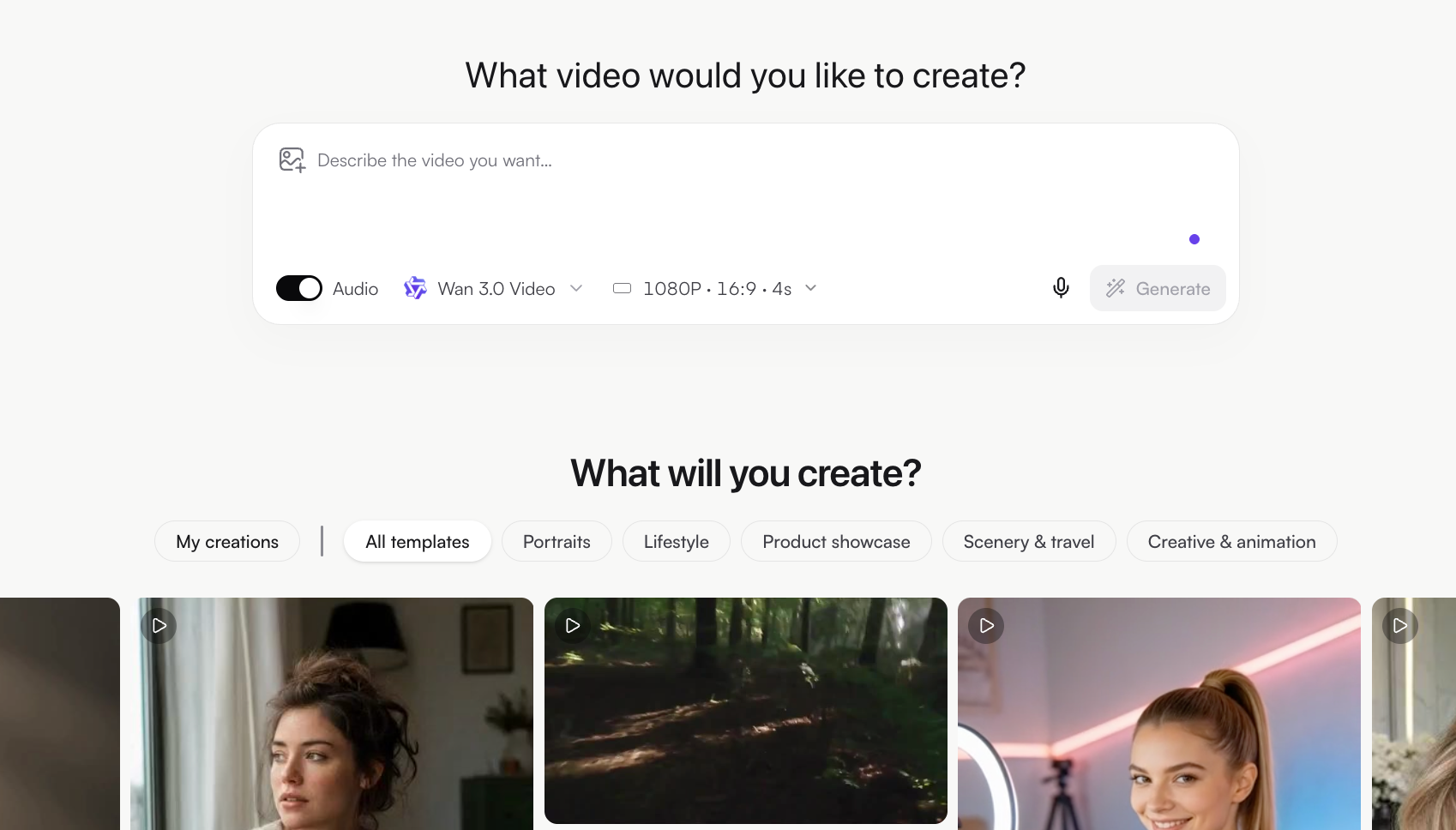
The MyClaw video generator is the simplest replacement for Sora's type-a-prompt-get-a-video workflow. MyClaw runs it in the browser: choose MiniMax H3 as the model, describe the shot, and set the aspect ratio and resolution options shown for that model.
Good uses:
- Short social clips for Reels, Shorts, and TikTok
- Product b-roll for landing pages and ads
- Storyboard tests before a bigger shoot
- Rebuilding old Sora ideas from your saved prompts
Workflow:
- Paste an old Sora prompt, or write a new one with subject, action, setting, camera, and mood.
- Trim it to one scene, since short clips work best with one clear action.
- Generate a few versions and keep the best take.
- Combine clips in your video editor and add music, voice, or captions.
Example prompts:
- "Slow push-in on [product] on a marble counter, morning light through a window, shallow depth of field"
- "Handheld shot of [character] walking through a rainy night market, neon signs, cinematic"
- "Aerial drone shot over [location] at sunrise, soft mist, calm and wide"
Con: The page does not list a video allowance or image-to-video input, so check current plan details before planning a large batch.
For more on running this model online, see this guide to MiniMax H3 free online.
2. Google Flow

Google Flow is Google's creative app for Veo video models. According to Google's Flow help center, every account gets 50 Flow credits a day, with or without a subscription. The next day's credits start from your first generation, and unused daily credits do not roll over.
Veo 3.1 Lite makes 4, 6, or 8-second clips in 720p for 10 credits each on non-Ultra accounts, so the daily credits cover up to five Lite clips. Two limits matter: users without a subscription may be unable to generate video during peak hours, roughly 2 to 5 PM UTC, and Google says Veo 3.1 Fast and Quality retire on December 5, 2026. Google AI plans add monthly Flow credits on top of the daily ones. Google's Flow help says every Flow video carries an invisible SynthID watermark.
Best for: free daily experiments with Google's video models. Plan a short test each day rather than one long project.
3. Runway

Runway is a full creative suite with its own models and partner models in one place. The Free plan includes 125 one-time credits that do not expire and do not refill, access to a limited set of models, and a Runway watermark on videos. Free users cannot buy extra credits.
Gen-4.5, Runway's flagship video model, requires the Standard plan or higher. It costs 12 credits per second, generates 2 to 10-second clips at 720p, and supports text-to-video and image-to-video. Standard is $12 a month billed yearly or $15 monthly, with 625 credits a month, no watermark, and access to all video and image models, including partner models listed on its pricing page.
Best for: creators who want generation, editing, and several models under one subscription.
4. Kling
Kling is a standalone video app known for character motion. Its paid-service terms say credits may be given to regular (free) accounts during promotional activities, without a fixed amount. The same terms list watermark removal and unrestricted commercial use as membership benefits, and ask non-members to keep Kling branding on generated content unless they have written permission. Treat free clips as tests. For more on the latest model, see this Kling 4.0 review.
Best for: testing character-driven scenes before subscribing.
5. Wan 2.2 (Open Source)
Wan 2.2 is the most "free" option in software terms. Both the official Wan-Video code repository and the model weights are released under Apache 2.0, and the model card says the developers claim no rights over generated content, within the license's use rules. The catch is hardware. The repository's single-GPU example commands are listed as running on:
- T2V-A14B: text-to-video at 480p or 720p, a GPU with at least 80 GB of memory (with memory-saving options enabled)
- TI2V-5B: text and image-to-video at 720p, a GPU with at least 24 GB, such as an RTX 4090 (with offloading)
Multi-GPU setups are faster. Running Wan 2.2 on your own machine has no license or per-clip fee, but hardware or rented cloud GPUs cost money, and setup takes technical comfort. Newer Wan versions are also compared in this Wan 3.0 vs Seedance 2.5 guide.
Best for: developers and studios that want private, local generation.
How to Move Your Sora Workflow to a New Tool
- Export first. Save your Sora videos and keep a document of your best prompts.
- Split long scenes. Most alternatives generate short clips, so break a long Sora prompt into several shots.
- Match the format. Pick the aspect ratio and resolution before generating, not after.
- Test the same three prompts. Run identical prompts in two or three tools and keep the one that matches your style.
- Check rights before posting. Free tiers often carry watermarks or personal-use limits.
If your videos are for songs, this guide to the best free AI music video generator covers tools that work from audio.
Conclusion
Sora is no longer available, so the right alternative depends on how you worked. The MyClaw video generator is the quickest prompt-to-clip replacement, Google Flow gives daily credits for Veo 3.1 Lite, Runway offers a full paid suite after one-time free credits, Kling suits character motion tests, and Wan 2.2 runs free on your own hardware. Export your Sora library, test a few prompts, and pick the tool that fits your workflow and budget.
Skip the Setup, Run Best-in-Class AI Agents Now
Launch a managed OpenClaw or Hermes Agent workspace in minutes, with always-on hosting, updates, and support handled by MyClaw.